


XScroll: scroll and have fun
4.2968.00 Reviews
App Specs
- Version
- 10.43.11
- Updated On
- License
- Free
- Downloads
- 1,000,000+
- Developer
- TEYRON LTD
- Categories
- Entertainment
- Platform
- Android
Screenshots



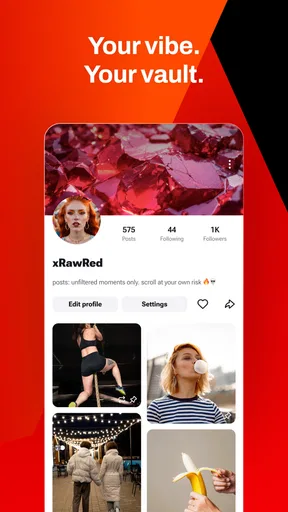

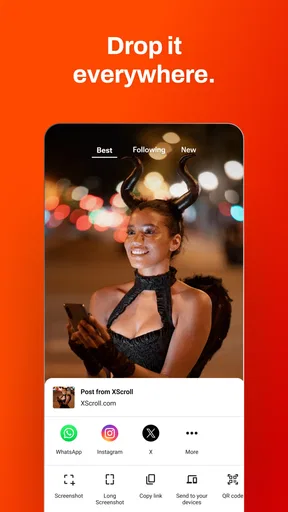


 Analysis by AppCompare
My usual reason for reaching for a scrolling app is simple: I have a few spare minutes and want something easy to dip into. With XScroll: scroll and have fun, that casual habit is the whole point. It’s an entertainment app from TEYRON LTD, and its appeal is the quick, low-commitment mix of spicy clips, cheeky humor, funny GIFs, and other bite-sized distractions. I’d treat it as a place to browse when I want a light break, not as a substitute for a focused video, reading, or social app.
When a quick break is the goal
The format suits the little gaps in a day: waiting for an appointment, taking a breather between tasks, or settling down when I don’t feel like choosing a full-length show. The material is framed for a Teen audience, so it is worth keeping that age guidance in mind if younger people share your device. The app is free, which makes trying it an easy decision, but the real question is whether its particular blend of humor and short-form entertainment matches your taste.
I find the strongest case for XScroll is when I want variety without having to plan what to watch. A clip can be a brief diversion; a GIF can deliver a joke almost instantly. That makes the app more suited to an unstructured pause than to a deliberate search for a specific creator, topic, or episode. If I already know exactly what I want to see, a service built around search and subscriptions is usually the more practical choice.
How I’d fit it into an ordinary day
Imagine I’m waiting for a friend and have a few minutes before they arrive. I can open XScroll, browse a little, and put the phone away when they show up without feeling as though I have abandoned a long video halfway through. That short-session rhythm is useful, but it can also make time pass unnoticed. I’d decide in advance whether I’m taking a quick break or settling in for longer, especially if I’m trying to keep phone use in check.
For that reason, I’d use the app differently depending on the moment. A quick look while standing in a queue is a better fit than browsing while crossing a street, driving, or trying to listen to someone. Short clips still demand attention, and the scrollable format can encourage one more swipe. I’d keep it for downtime rather than letting it compete with work, sleep, or face-to-face conversations.
Where it sits among entertainment apps
XScroll belongs to the broad world of casual mobile entertainment, but its mix of clips, humor, and GIFs gives it a lighter, more varied feel than opening a single-topic video service. Compared with a subscription-based streaming app, it is easier to dip into and less suited to following a story from one episode to the next. Compared with a social feed built around people I know, it is more about passing content than keeping up with friends. That distinction matters: I’d choose XScroll for spontaneous browsing, and a more focused app when I want a particular program, community, or creator.
It has an average rating of 4.3 from around 6,400 ratings, with more than 100,000 installs. Those figures suggest that plenty of people have tried it, but they don’t guarantee that every user will enjoy the same style of humor or mix of content. I’d use the free download to judge that for myself rather than assuming popularity means a perfect fit.
Worth Reading Before You Choose

EA SPORTS FC Mobile 26 Is a Bigger Football Game, but It Takes Time

Flipboard Shows What News Apps Must Do Beyond the Feed

Switching to Android Auto Means Rethinking Your Driving Routine

Google Calendar Makes a Crowded Week Easier to Manage

Ludo King Makes the Most of the Minutes Between Plans

Baby Panda World Brings Quick Play to Modern Phones, but Its Game Library Feels Busy
Getting Started with XScroll
Right off the bat, downloading and installing XScroll: scroll and have fun was a breeze. Available on both Android and iOS, it took just a few taps, and I was ready to roll. Once opened, the app greeted me with a sleek, intuitive interface that made navigation a cinch. It’s like the developers knew exactly what I was looking for—simplicity with a splash of flair.
Features That Stand Out
So, what sets XScroll apart from the plethora of scrolling apps out there? Let me break it down for you:
- Interactive Challenges: Each scroll unlocks a new challenge. It's not just about mindlessly scrolling; it's about engaging with what you see. Sometimes it’s a puzzle, other times a trivia question. Keeps you on your toes!
- Personalized Content: The app learns your preferences and tailors content to suit your interests. It's like having a personal curator.
- Reward System: As you scroll and complete challenges, you earn points. These points can be redeemed for in-app goodies, adding an extra layer of motivation.
- Social Sharing: Share your achievements and compete with friends. It’s a fun way to stay connected and maybe show off a bit.
User Experience and Design
The design of XScroll is one of its strongest suits. The vibrant colors and fluid animations make every interaction feel lively and engaging. The user interface is clean and does not overwhelm you with too many options. Everything feels just a tap away, and the transitions are seamless.
Navigation through the app is smooth, thanks to its minimalistic design. Whether you're tech-savvy or not, you'll find it easy to use. The developers have really nailed the balance between functionality and aesthetics.
Why You Might Love It
If you're someone who enjoys casual gaming mixed with everyday activities, XScroll is your jam. The app’s ability to make scrolling a more interactive and rewarding experience is its biggest draw. Plus, the personalized content ensures that you’re always engaged with something you actually care about.
For those who love a bit of competition, the social sharing feature adds a nice touch. Competing with friends or even just sharing your progress keeps things exciting.
What to know before making it a habit
The store version is 10.39.11, and it supports Android 8.0 or later. If you’re deciding whether it belongs on your phone, those practical details help establish whether your device is compatible. The app’s Teen age guidance is also a useful reminder to think about who might see the screen when you browse in shared spaces.
One useful way to keep the experience intentional is to treat each visit as a short break with a clear stopping point. For instance, I might open it while waiting for a takeaway, enjoy a few pieces of content, then close it when my order is ready. That works better than opening a feed automatically whenever I feel bored, because a stream of brief items can make it easy to lose track of why I picked up my phone.
Another trade-off is variety versus control. A mixed feed can spare me the effort of choosing a specific video, but it may not be as satisfying as a carefully selected playlist when I’m in the mood for a certain subject. If I want something familiar, a saved list in a video platform is a better handoff from one viewing session to the next. If I just want an unpredictable, lightweight diversion, XScroll makes more sense.
I’d also be thoughtful about sharing. The app’s entertainment is the main draw, while sending something to a friend only helps if that person enjoys the same humor and is free to watch it. A quick recommendation can be a fun conversation starter, but I wouldn’t assume every clip is suitable for every group or setting. The Teen rating is a sensible cue to use judgment before showing content to someone else.
The app is maintained by TEYRON LTD, and its 423 written reviews offer another perspective beyond the broader rating count. I’d read recent user comments if I were weighing a specific concern, then try the free app myself; people can differ sharply on what counts as funny, entertaining, or worth returning to. That’s especially true for a feed whose appeal depends on the content mix rather than one fixed program.
Who should choose it—and who should pass
I’d recommend giving XScroll a try if you enjoy short-form browsing and want an entertainment app that can fill awkward gaps without requiring a plan. It’s a reasonable fit for someone who likes quick jokes and clips more than long viewing sessions, and who is comfortable letting a casual feed provide the next diversion. The current version is 10.39.11, while Android users need version 8.0 or later; those are worth checking before installing.
I’d skip it if endless scrolling is already a habit you’re trying to reduce, or if you prefer to choose every item in advance. People looking for a dedicated comedy catalog, a specific creator’s uploads, or a structured watchlist may be happier elsewhere. And if you need entertainment that stays in the background while you concentrate, this is not an ideal choice: short visual content pulls attention toward the screen.
Final Thoughts
All in all, XScroll: scroll and have fun is a delightful app that turns a mundane task into an opportunity for fun and discovery. It's perfect for those moments when you want to pass the time but still crave a bit of interaction. Whether you’re in the waiting room, commuting, or just lounging at home, give XScroll a try—it might just become your new guilty pleasure.
Check it out for yourself, and let me know if it adds a bit of joy to your scrolling routine. Happy scrolling!
Pros
- User-friendly interface with smooth navigation.
- Offers a variety of engaging content to explore.
- Customizable settings for personalized experience.
- Regular updates with new features and improvements.
- Low impact on device performance and battery life.
Cons
- Limited offline functionality for data saving.
- Occasional ads can interrupt the user experience.
- Requires stable internet for optimal performance.
- Some features locked behind a paywall.
- Limited support for older device models.
FAQs for XScroll: scroll and have fun
What is XScroll and how does it work?
XScroll is an innovative app designed to enhance your scrolling experience with fun and interactive elements. It combines traditional scrolling with engaging mini-games and challenges that appear as you scroll through your favorite content. Users can customize their experience with various themes and settings to suit their preferences.
Is XScroll compatible with all devices?
XScroll is available for both Android and iOS devices. It supports a wide range of smartphones and tablets, offering optimal performance on most modern devices. However, it is recommended to check the app's compatibility with your specific device model and operating system version in the app store before downloading.
Does XScroll require an internet connection to function?
XScroll requires an internet connection for certain features, such as downloading new themes and accessing online leaderboards. However, the core functionality and many of the mini-games can be enjoyed offline. For the best experience, an occasional internet connection is recommended to access all available features.
Are there any in-app purchases or ads in XScroll?
XScroll offers a free version with ads and optional in-app purchases. Users can choose to purchase premium themes, additional mini-games, and an ad-free experience. While the free version provides a comprehensive experience, the premium options enhance the app's functionality and remove interruptions from ads.
How does XScroll ensure user privacy and data security?
XScroll is committed to protecting user privacy and data security. The app collects minimal personal information, primarily for improving user experience and performance. All data is encrypted and securely stored. Users can access the privacy settings within the app to manage permissions and understand what data is collected and how it is used.


